Skip to content
HoppinGeek

HoppinGeek

Evergreen content that's useful for users

  • Internet
  • Operating System
    • Android
    • IOS
    • Linux
    • Mac
    • Windows
  • Buying Guide
  • Wallpapers

You are here:

  • Home
  • Internet
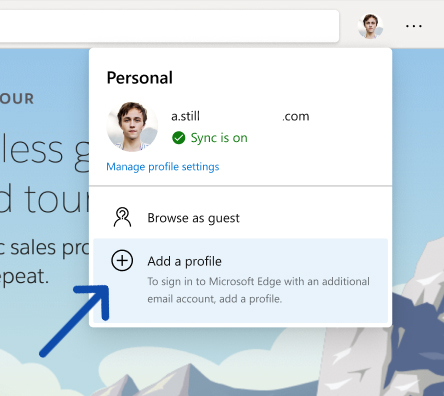
  • How to Use Multiple User Profiles in Microsoft Edge Browser like a Pro
  • 002

002

June 6, 2020 Amit Mondal
  • Facebook
  • Twitter
  • WhatsApp
  • Email

002

  • Facebook
  • Twitter
  • WhatsApp
  • Email
  • Facebook
  • Twitter
  • Instagram
  • YouTube
  • LinkedIn

You Might Like

  • Intercity Travel-tech startup gogoBus raises investment from ixigo, others Intercity Travel-tech startup gogoBus raises investment from ixigo, others
  • grammarly vs microsoft editor Gram­marly vs Microsoft Edi­tor, Best Gram­mar Check­ing Tool
  • Reset Display Settings Windows 10, Reset Dis­play Set­tings to Default How to Reset Display Settings Windows 10, Revert to Default Display Settings
  • Force Delete a File, force delete a file in windows 10 Top 3 Ways to Force Delete a File or Fold­er in Win­dows 10
  • Update Device Drivers Guide Properly Update Device Drivers on Windows 10
  • Block Ads on Youtube Android How to Block Ads on Youtube Android, Block Ads on Youtube App
© 2020 - 2021 Hoppingeek. All Rights Reserved.
  • About me
  • Contact us
  • Privacy Policy